
Livedocs

The AI-native data analysis notebook with SQL, Python and real-time collaboration

💰Free / Starting at $30/month ★★★★½ 4.6/5 (58 reviews)
Data & Analytics
#Business intelligence #Dashboards #Data visualisation

Overview of Livedocs

https://livedocs.com
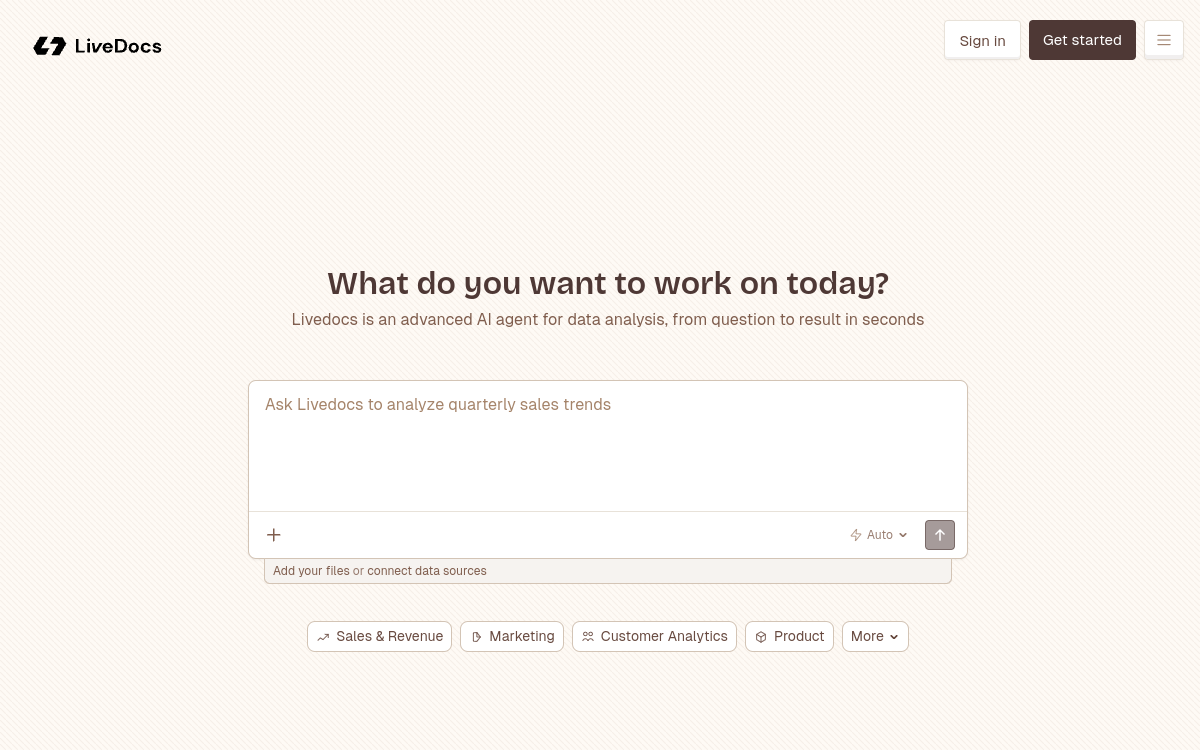
Screenshot of Livedocs
Visit Livedocs →

Présentation détaillée

Livedocs is an __AI-native data platform__ that rethinks the analysis notebook. Unlike Jupyter, its cells are __reactive__: they automatically recalculate when data changes, like in a spreadsheet. The tool integrates SQL, Python, an __AI agent__ capable of answering your questions in natural language, interactive charts and the publication of shareable applications. With integrations to __Snowflake, BigQuery, Postgres__ and tools like Google Analytics or Stripe, Livedocs targets data teams wanting to move fast without sacrificing power.

What is Livedocs?

Livedocs is an AI-native data platform that combines a reactive analysis notebook, a general AI agent and a light application creation tool in a single environment accessible from a web browser. Users can import files or connect databases, then ask questions in natural language, write SQL or Python to get answers, charts and shareable reports.

Key Features

The flagship feature of Livedocs is its reactive notebook: cells automatically recalculate when their dependencies change, eliminating the classic Jupyter errors. The platform allows you to write SQL and Python side by side in the same document, with smooth transition between the two languages. The integrated AI agent can answer questions about your data, generate code, fix errors and explain results in clear language. Publishing interactive applications is native: with one click, a notebook becomes a shareable app without additional development. Integrations include Snowflake, BigQuery, Postgres, ClickHouse, Google Analytics, Stripe and HubSpot.

Use Cases

Livedocs is ideal for data teams wanting to analyze CSV files or data warehouses without setting up heavy infrastructure. Financial analysts can query their Stripe or HubSpot data in natural language and publish dashboards for their teams. Startups appreciate the ability to create interactive reports quickly, without DevOps. Data scientists use the SQL/Python combination for exploratory analysis before moving to more specialized environments.

Advantages

The main benefit of Livedocs is reducing the time between question and insight. Cell reactivity eliminates execution order errors. The AI agent accelerates data exploration for users less comfortable with code. Real-time collaboration avoids back-and-forth on static notebooks. Publishing shareable applications allows you to distribute insights to non-technical stakeholders without additional effort.

Pricing

Livedocs offers a free plan at $0/month including unlimited documents, 8 GB of RAM, 2 vCPU and $5 in monthly AI credits. The Pro plan is $30/month per workspace, with $20/month per additional member, and includes 32 GB of RAM, real-time collaboration, scheduled executions, terminal access and integrations with Snowflake, Databricks and BigQuery. An Enterprise plan with custom pricing is available for on-premise needs and SSO.

Conclusion

Livedocs represents a significant evolution in traditional data notebooks. Its reactivity, integrated AI agent and ability to publish applications without deployment code make it a particularly well-suited tool for modern data teams seeking speed and accessibility.

✅ Strengths

  • Reactive notebook: automatic recalculation of dependent cells
  • Native combination of SQL and Python in the same document
  • Built-in AI agent to query data in natural language
  • Publishing of shareable applications without deployment code
  • Integrations with Snowflake, BigQuery, Postgres and more
  • Generous free plan with $5 in monthly AI credits included

⚠️ Limits

  • Pro plan limited to a single workspace by default
  • Some data integrations reserved for Pro plan
  • Less mature than Jupyter for scientific workflows
  • Interface in English only for now
👤 GOOD CHOICE?

Livedocs est-il fait pour vous ?

✓ Ideal if you…

  • Équipes data cherchant un notebook collaboratif moderne
  • Analysts souhaitant mêler SQL, Python et IA
  • Startups et PME voulant explorer leurs données sans DevOps
  • Équipes souhaitant publier des dashboards sans développement

✗ To avoid if you…

  • Data scientists nécessitant un environnement GPU intensif
  • Grandes entreprises avec des besoins on-premise complexes
  • Utilisateurs cherchant un outil 100 % no-code sans code
  • Équipes travaillant exclusivement sur des modèles ML avancés

🎯 Our verdict

Livedocs stands out as a modern and AI-native alternative to traditional notebooks like Jupyter. Its main strength is the reactivity of its cells, which eliminates errors from disordered executions and makes the analysis workflow much smoother. The combination of SQL + Python in the same document, without friction, is a real productivity gain for data teams that constantly juggle between the two languages. The integrated AI agent is a differentiating feature: it allows you to query databases or CSV files in natural language, considerably accelerating data exploration. The ability to publish notebooks as shareable applications without a line of deployment code is also a considerable advantage for teams wanting to distribute their insights to non-technical stakeholders. The free plan is generous with its $5 in monthly AI credits and computing resources (8 GB RAM), making it an accessible option for freelancers and small teams. The Pro plan at $30/month offers good value for money with 32 GB of RAM and real-time collaboration. Livedocs is not yet as mature as Jupyter for advanced machine learning workflows, but for exploratory analysis, visualization and insight sharing, it is one of the most efficient tools on the market.

❓ FREQUENT QUESTIONS

FAQ — Livedocs

What is the difference between Livedocs and Jupyter?
Unlike Jupyter, Livedocs offers reactive cells that automatically recalculate when data changes, real-time collaboration and publishing of apps without deployment code.
Is Livedocs free?
Yes, Livedocs offers a free plan including unlimited documents, 8 GB of RAM, $5 in monthly AI credits and local access. The Pro plan is $30/month per workspace.
What data sources does Livedocs support?
Livedocs connects to Snowflake, BigQuery, Postgres, ClickHouse, CSV files, and has native integrations with Google Analytics, Stripe, HubSpot and other SaaS tools.
Can I share Livedocs analyses with non-technical people?
Yes, Livedocs allows you to publish notebooks as shareable interactive applications, without any deployment code required.
Can Livedocs' AI agent answer questions in French?
Livedocs’ AI agent works primarily in English, but can understand and process requests made in other languages depending on the model used.
★★★★½ 4.6/5 (58 avis)
✅ Verified by Comparateur-IA
Data & Analytics

The AI-native data analysis notebook with SQL, Python and real-time collaboration

💰 Rate Free / Starting at $30/month
🆓 Free trial Yes
🌐 Languages 🇬🇧 English
Visit the site →
🔗 Also to discover

Related resources

This site is registered on wpml.org as a development site. Switch to a production site key to remove this banner.