



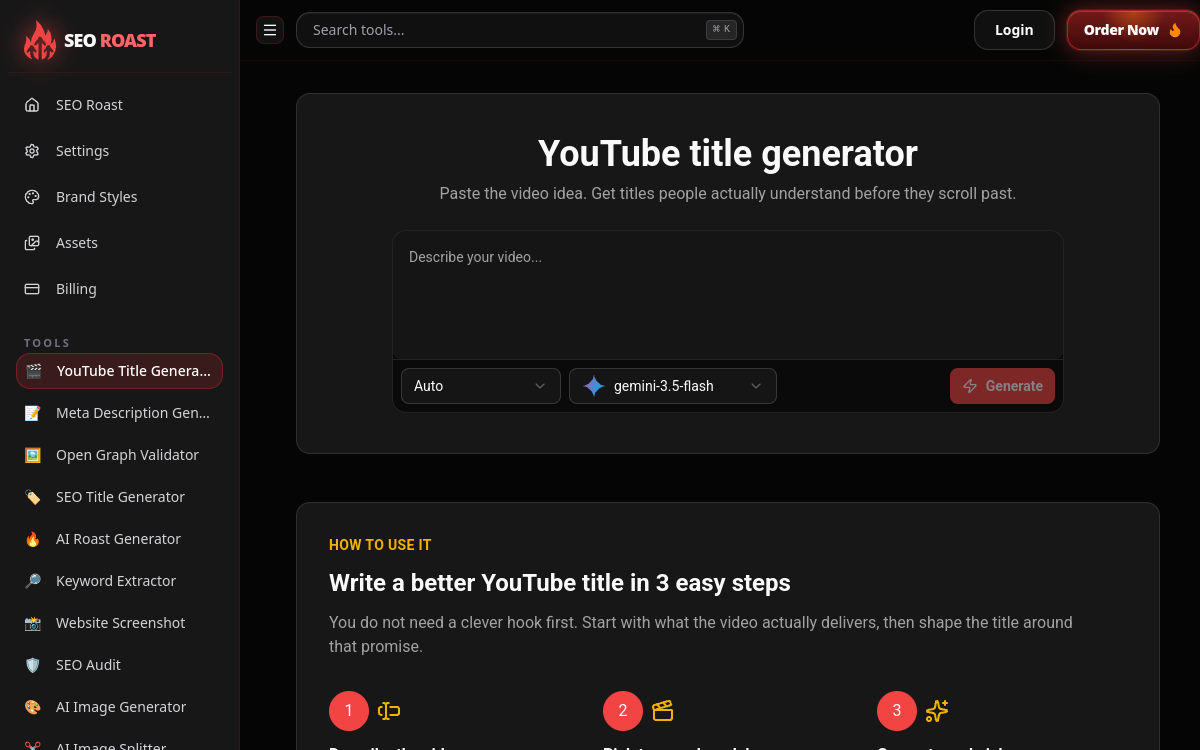
Finding a good YouTube video title is often harder than shooting the video itself. A weak title can bury excellent content, while a clear and catchy title makes the difference between an ignored video and a clicked video. This is precisely the problem that SEORoast’s YouTube Title Generator seeks to solve—a free online tool dedicated to generating titles designed for clicks. Rather than staring at a blank screen, the creator simply enters their video subject and receives back several title proposals to compare. Integrated into the SEORoast suite of utilities, this tool is aimed at video creators, community managers, and content creators who want to improve their click-through rate without spending hours on it. In this overview, we see what it actually does, its features, use cases, benefits, its free model, and what to take away from it.
What is YouTube Title Generator (SEORoast)?
The essentials
YouTube Title Generator is a web tool published by SEORoast, a platform whose core business is video SEO audits for SaaS founders, and which also offers over twenty free utilities around SEO and content. This title generator is part of that toolbox. Its role is to produce, from a video idea, a series of usable titles on YouTube. The user provides a subject, an angle, or a script summary, and the tool returns several title variations to choose from. The stated goal is simple: help write titles that clearly say what the video is about and why you should click. So it’s a specialized writing assistant, lightweight and focused on a single task.
Key features
The tool relies on a few well-targeted features. First, multiple generation: for each request, several titles are proposed, allowing you to compare and choose the most relevant one. Next, customizable tones: you can direct the generation toward a clickbait style, a style optimized for SEO, a format suited to Shorts, or let automatic mode decide. The tool also offers the ability to select different AI models depending on the run launched, which varies the wording and style of the titles. On the ergonomics side, results display in a comparative view, as cards or in a list, to quickly visualize options side by side. Finally, a copy-paste function lets you grab the chosen title in one click to paste it directly into YouTube or a document. Overall it stays deliberately simple: no complex configuration, you enter an idea and get titles in a few seconds.
Use cases
Usage revolves around regular video content production. A YouTube creator hesitant about their title wording can generate a dozen variants and choose the one promising the best click-through rate. A video creator specializing in Shorts can use the dedicated tone to get a short, punchy title suited to the vertical format. A community manager managing multiple channels or publishing many videos saves time by avoiding blank page syndrome for each episode. Beginners also find value in it: by testing several angles, they discover how to vary the hook and learn to craft more engaging titles. The tool is also useful during brainstorming, to quickly explore several directions before settling on the final title.
Advantages
The first advantage is speed: in seconds, you go from a simple idea to a list of usable titles. The second is variety, thanks to customizable tones covering both clickbait and SEO or Shorts, and the choice of AI model that further diversifies the proposals. The third benefit is free access, which makes it a no-commitment solution for any creator. The comparative display makes decision-making easier by putting options side by side, and copy-paste streamlines the path to publication. Finally, integration into the SEORoast suite lets you access, from the same environment, other content utilities like the keyword extractor or meta-description generator.
Pricing
YouTube Title Generator is offered free online. Some features may require account login, but title generation remains free to use. This tool is part of a SEORoast suite with over twenty utilities. SEORoast’s business model lies elsewhere: its paid offering covers video SEO audits, charged as one-time payments, around $250 for a public audit and $550 for a private audit, delivered within a few business days. The title generator itself doesn’t fall under this pricing and remains a free supplementary tool.
Conclusion
SEORoast’s YouTube Title Generator does exactly what it promises: transform a video idea into multiple ready-to-publish titles, for free and in seconds. With its customizable tones, AI model choice, and comparative display, it’s a handy assistant for saving time and sparking creativity. It doesn’t replace a channel strategy or performance tracking, but as a one-off tool to help write titles, it fully delivers on its promise for YouTube creators of all levels.