



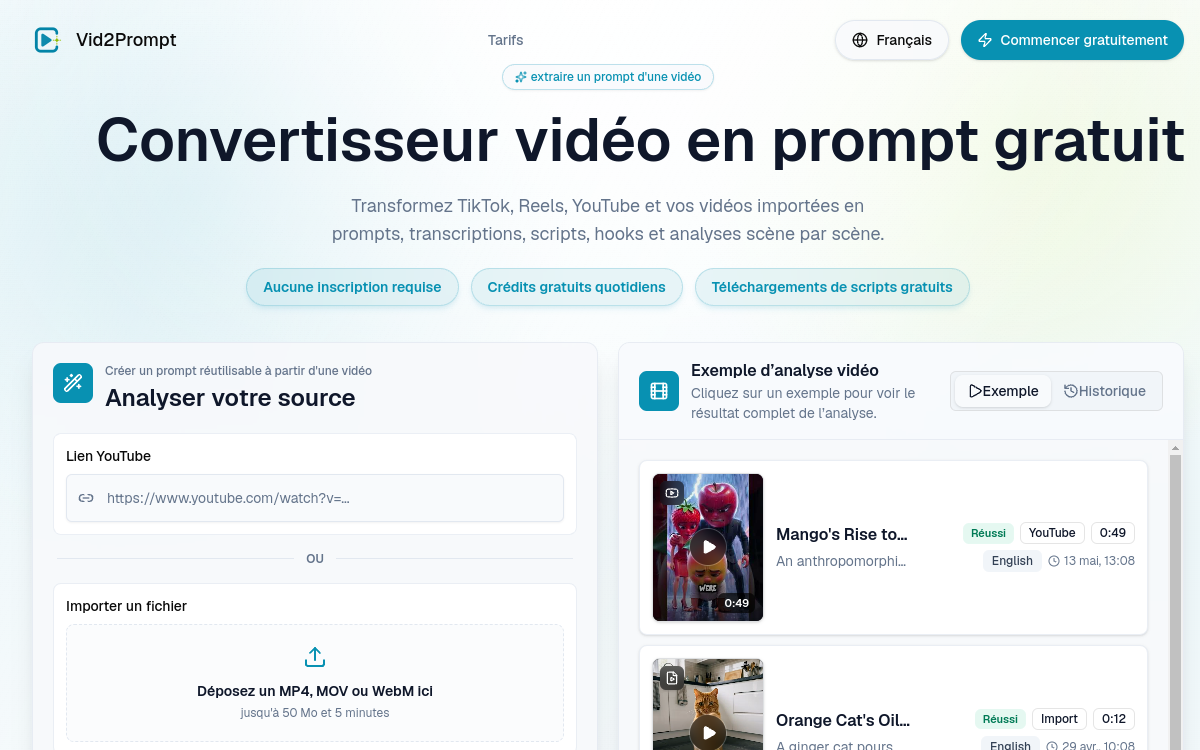
Understanding why a short video works often requires watching it repeatedly, noting the hook, the pacing of shots, and the call-to-action. Vid2Prompt automates this observation work. The tool takes a TikTok, Instagram Reels, or YouTube link, or an imported file, and extracts a structured analysis: reusable prompt, transcription, script, scene-by-scene breakdown, and visual direction notes. For content creators and marketers, it’s a quick way to break down what makes a video effective, then reuse this formula in their own productions. In this overview, we detail what Vid2Prompt is, its features, concrete use cases, benefits, pricing model, and for whom it truly makes sense.
What is Vid2Prompt?
The essentials
Vid2Prompt is a web-based video analysis tool that converts a video into usable text elements. Rather than producing or editing content, it does the opposite: it breaks down an existing video to reveal its structure. From a social link or an MP4, MOV, or WebM file, it generates a ready-to-use prompt, full transcription, opening hook, complete script, and shot-by-shot breakdown. It targets short-form creators, performance marketers, SaaS teams, and AI video creators who want to understand and replicate formats that perform.
Key features
Vid2Prompt groups several automatic processes around the same video. Transcription extracts all spoken text. Hook identification highlights the opening phrase or scene that hooks viewers in the first seconds, crucial for retention. Scene-by-scene breakdown segments the video and associates visual direction and camera language notes. The tool assigns a script quality score, detects the call-to-action, and generates relevant tags. The most distinctive result remains the structured prompt: a reusable formulation to recreate a similar format with an AI video generator. On the input side, the tool handles TikTok, Reels, and YouTube links, as well as imported files up to 50 MB and 5 minutes. No signup is required for a first test, which significantly lowers the barrier to entry for assessing the relevance of the analyses.
Use cases
Several scenarios naturally emerge. A short-form creator analyzes a viral video to extract the hook structure and shot pacing, then adapts this formula to their niche. A performance marketer dissects competitor UGC ads to understand their messaging and call-to-action. A SaaS team studies the most engaging product demos and founder stories to calibrate their own videos. An AI video creator retrieves a structured prompt from a reference to inject into their generator. Educators and researchers use it to transcribe and document video content quickly. In each case, the objective is the same: transform visual observation into reusable textual material.
Advantages
The first benefit is time savings: what used to take multiple viewings and manual note-taking is reduced to pasting a link. The second is structure: instead of vague impressions, you get a clear breakdown of the hook, scenes, and call-to-action. The third is accessibility, with a trial without signup and very low pricing. Finally, the prompt orientation makes the transition to production with AI video generation tools easier. For a content creation workflow, Vid2Prompt fills the often-overlooked step of analyzing references before production.
Pricing
Vid2Prompt offers free access with daily credits and a trial without signup. Paid tiers are billed in dollars: the Starter plan at $3.99/month offers 200 credits or roughly 50 analyses, the Standard plan at $7.99/month provides 500 credits or roughly 125 analyses, and the Team & Company plan at $27.99/month gives 5,000 credits or roughly 1,250 analyses. Annual billing applies a discount of roughly 60%. Each analysis consumes 4 credits, and the editor indicates cancellation is possible at any time with a refund within 7 days.
Conclusion
Vid2Prompt does one thing and does it well: it reveals the structure of a short video and returns it in usable form. It’s not an editing suite or a generator, but a targeted analysis tool for those who want to understand and replicate formats that work. With a free trial without signup and pricing starting at $3.99/month, it integrates easily as an analysis component in a short-form content creation or video marketing workflow.